
If you train with a Garmin watch, Connect IQ 9.3 gives third-party developers more ways to use its microphone and speaker. The update provides microphone and speaker access on supported watches, opening up possibilities for spoken workout cues, voice notes and custom audio alerts.
Connect IQ SDK 9.3.0 was released in October 2026. Its recording and playback tools have permission requirements and restrictions on background recording. For watch owners, new voice features still depend on developers building and releasing apps that use these tools.
Quick answer:
- What changed: Connect IQ 9.3 lets third-party apps record from the watch microphone (the Audio.Capture module) and play sound through its speaker (Audio.Output) on supported Garmin watches.
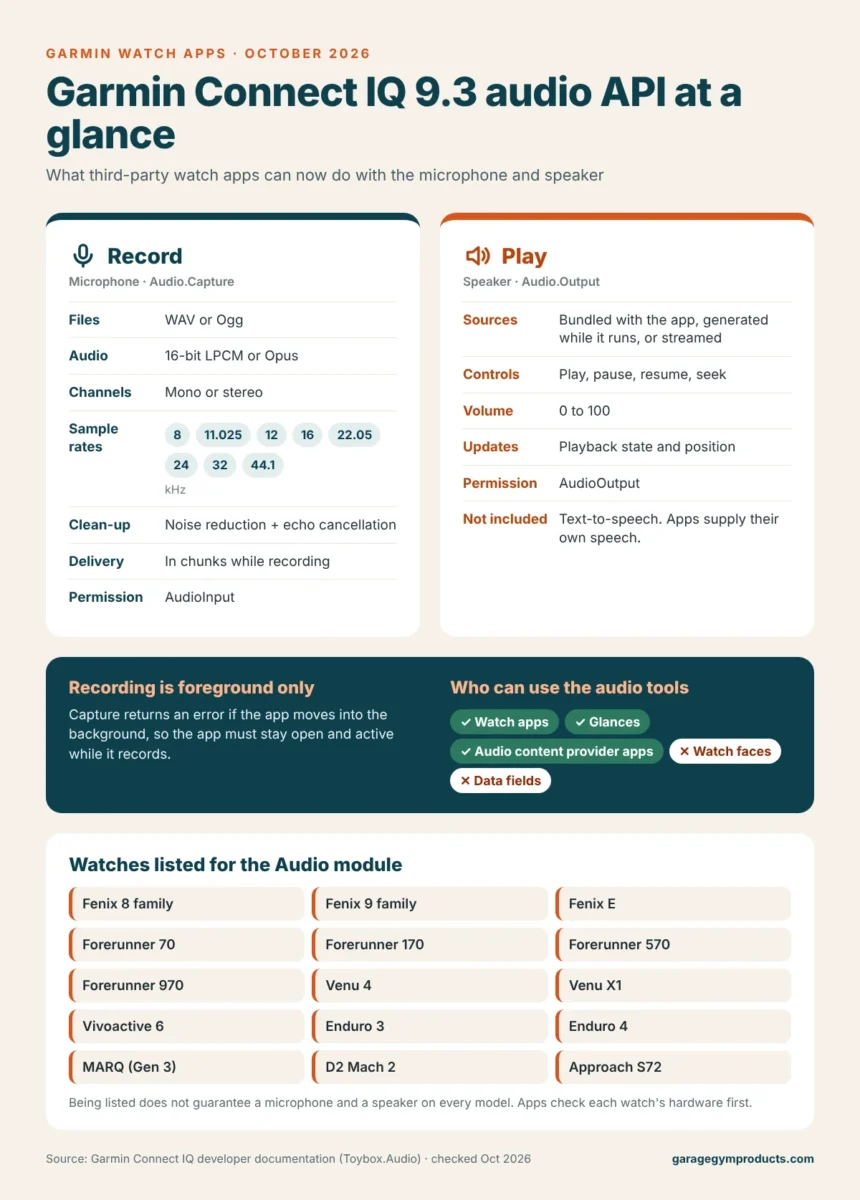
- Recording options: WAV or Ogg files, uncompressed LPCM or Opus audio, 8 to 44.1 kHz, mono or stereo, with optional noise reduction and echo cancellation.
- The rules: recording only works while the app is active, and apps need the AudioInput permission to record and the AudioOutput permission to play sound.
- Who can use it: watch apps, glances and audio content provider apps. Watch faces and data fields cannot.
- What it is not: a built-in voice recorder, text-to-speech engine or AI assistant. Watch owners get new voice features only when developers release apps that use the tools.
Details checked against Garmin’s Connect IQ developer documentation in October 2026.
What Connect IQ 9.3 Adds for Audio Apps
The audio capture tools allow an app to receive recorded sound from a watch’s microphone. Developers can apply noise reduction and echo cancellation during recording. Apps can also receive audio in chunks, allowing processing to continue while recording is underway.
The developer tools support WAV and Ogg audio recording, with uncompressed audio or Opus compression, sample rates between 8 and 44.1 kHz, and mono or stereo channels. These options give app makers different ways to balance sound quality against processing and data requirements.
The playback tools let apps play audio bundled with an app, created while it runs, or supplied progressively as a stream. Controls include play, pause, resume, seek and volume, along with updates on playback position and state.
For spoken coaching, an app would need to supply its own recorded or generated speech. Access to audio playback does not, by itself, provide a text-to-speech service.
Here is how the new recording and playback tools compare, along with the rules that apply to both:
Recording Requires an Active App and Permission
Microphone recording must happen while the app is active. The documented behavior includes an error if an app tries to capture audio after moving into the background. That means developers cannot use this capability to keep the microphone recording continuously once the app becomes inactive.
Microphone capture and audio playback also need their respective permissions. In Garmin’s documentation, those are the AudioInput permission for recording and the AudioOutput permission for playback. The audio tools are listed for watch apps, glances and audio apps, but watch faces and data fields cannot use them.
For training apps, those limits matter. A voice-note feature would need to record speech during active use. Developers would have to account for that requirement when laying out recording controls and workout screens, rather than relying on recording to continue in the background.
Which Garmin Watches Are Relevant?
Devices listed for the new audio module include the Fenix 8 and Fenix 9 families, Forerunner 570 and 970, Venu 4, Venu X1 and Approach S72, among others.
Garmin’s developer documentation also lists the Forerunner 70 and 170, Vivoactive 6, Enduro 3 and Enduro 4, MARQ (Gen 3), D2 Mach 2 and Fenix E for the Audio module.
Being listed for module support does not confirm that every model has both a microphone and a speaker. Developers still need to check the hardware capabilities of each watch before attempting recording or playback. A broad compatibility list is not a guarantee that every audio function will work on every listed device.
Voice Notes and Spoken Coaching Are Potential Uses
For gym training, possible uses include spoken interval instructions, custom exercise alerts and short voice notes between sets. An app could also send captured speech to an external service for transcription or AI processing, provided its developer builds the required connection and processing workflow.
These are potential applications of the new tools, not features delivered by the SDK release itself. The release does not install a voice recorder, add an AI assistant or bring a new coaching service to a watch.
It also fits a wider pattern, as Garmin has been moving deeper into training software this year. Until third-party audio apps arrive, a dedicated interval timer with audible beeps is still the simpler way to get cues between sets in a garage gym.
For Garmin owners, the next concrete step is an app release that clearly lists its supported watches, required permissions and audio features. For developers, Connect IQ 9.3 supplies the recording and playback capabilities to build those features, within the limits of each device’s hardware and the requirement to keep the app active while recording.
Garmin Connect IQ 9.3 Audio FAQ
Which Garmin watches support Connect IQ microphone and speaker access?
Garmin lists the Audio module for the Fenix 8 and Fenix 9 families, Fenix E, Forerunner 70, 170, 570 and 970, Venu 4, Venu X1, Vivoactive 6, Enduro 3 and 4, MARQ (Gen 3), D2 Mach 2 and Approach S72. Apps still need to check whether each watch has the microphone or speaker they need.
Can Garmin watch apps record audio in the background?
No. Garmin’s capture tools return an error if an app tries to record after moving into the background, so recording only works while the app is open and active.
What permissions do Connect IQ audio apps need?
Recording needs the AudioInput permission and playback needs the AudioOutput permission. An app that does both needs both.
Can Garmin watch faces use the microphone or speaker?
No. The audio tools are listed for watch apps, glances and audio content provider apps only, so watch faces and data fields cannot record or play sound with them.
Does Connect IQ 9.3 add text-to-speech to Garmin watches?
No. The playback tools play audio an app bundles, generates or streams, so a coaching app has to supply its own recorded or generated speech.
When will Garmin watch apps with voice features be available?
There is no set date. The SDK gives developers the tools, so voice notes, spoken cues and similar features will appear as individual apps are updated or released in the Connect IQ Store.
Fenix 8 owners may also want to review Garmin’s recent heart-rate tracking fix for that watch.

